

Vitamin D, often called the “sunshine vitamin”, is essential for strong bones, healthy muscles, immunity, and mental well-being. Sunlight is the most natural and effective way for the body to produce vitamin D. Best Time for Vitamin D Contrary to popular belief, early morning sunlight is not the most effective. Experts suggest that the ideal time is between 10 a.m. and 3 p.m. During these hours, the sun is high in the sky and UVB rays, which help the skin produce vitamin D, are at their strongest. How Long Should You Stay in the Sun? For most people, 5 to 30 minutes of sun exposure, several times a week, is sufficient. Exposing areas like the face, arms, and legs helps boost vitamin D production. People with darker skin or older adults may need slightly more time. Important Things to Keep in Mind Spending too much time in the sun can cause skin damage or sunburn, so exposure should be short and sensible. Sunlight coming through windows or glass does not help with vitamin D production. If staying outdoors longer, using sunscreen and protective clothing is recommended. Season and Location Matter In winter months or regions far from the equator, UVB rays may be weaker. In such cases, dietary sources or supplements may be needed to maintain healthy vitamin D levels. Disclaimer: This content is for general informational purposes only and is not a substitute for medical advice. Vitamin D needs vary based on health conditions, skin type, age, and location. Always consult a qualified healthcare professional before making changes to your sun exposure or starting supplements.

Auspicious (Nalla Neram) time today (Jan 05th)
January 05, 2026 – Monday | Margazhi 21 | Visuvavasu Year Auspicious Timings Morning 06:30 AM – 07:30 AM Evening 4:30 PM – 5:30 PM Inauspicious Timings Emakandam 10:30 AM – 12:00 PM Gulikai 01:30 PM – 03:00 PM Rahu 07:30 AM – 09:00 AM Astrological Details Thithi Trithiya Nakshatram Poosam Chandrashtamam Mulam Sulam East Remedy Curd

Auspicious (Nalla Neram) time today (Jan 04th)
January 04, 2026 – Sunday | Margazhi 20 | Visuvavasu Year Auspicious Timings Morning 06:00 AM – 07:00 AM Evening 3:30 PM – 4:30 PM Inauspicious Timings Emakandam 12:00 PM – 01:30 PM Gulikai 03:00 PM – 04:30 PM Rahu 04:30 PM – 06:00 PM Astrological Details Thithi Tithitvayam Nakshatram Punarvasu Chandrashtamam Kettai Sulam West Remedy Jaggery

Gold Price Drops by ₹60 per Gram Today | January 3, 2026
Gold prices witnessed a decline on Saturday morning (03.01.2026), bringing relief to jewellery buyers and investors. The price of gold fell by ₹60 per gram, while the cost of one sovereign dropped by ₹480. Today’s Gold Rates 22 Carat Gold: ₹12,520 per gram 22 Carat Gold (1 Sovereign – 8 grams): ₹1,00,160 24 Carat Pure Gold: ₹13,658 per gram Silver Price Today Silver (1 kg): ₹2,56,000 Silver (1 gram): ₹256 Market experts attribute the dip in gold prices to fluctuations in international markets and cautious trading ahead of the weekend.

Auspicious (Nalla Neram) time today (Jan 03rd)
January 03, 2026 – Saturday | Margazhi 19 | Visuvavasu Year Auspicious Timings Morning 07:30 AM – 08:30 AM Evening 04.30 PM – 05.30 PM Inauspicious Timings Emakandam 01:30 PM – 03:00 AM Gulikai 06:00 AM – 07:30 AM Rahu 09:00 AM – 10:30 AM Astrological Details Thithi Full moon Nakshatram Thiruvathirai Chandrashtamam Anusham Sulam East Remedy Curd

ஆரணியில் நாளை மின் தடை!
ஆரணி துணை மின் நிலையத்தில் நாளை 03.01.2026 (சனிக்கிழமை) பராமரிப்பு பணிகள் மேற்கொள்ள உள்ளதால் ஆரணி நகரம், பள்ளிக்கூடத்தெரு, சைதாப்பேட்டை, வி.ஏ.கே.நகர் எஸ்.எம்.ரோடு, ஆரணிப்பாளையம், கொசப்பாளையம், இ.பி.நகர், சேத்பட் ரோடு, சேவூர், ரகுநாதபுரம், முள்ளிப்பட்டு, ஹவுசிங் போர்டு, மொழகம்பூண்டி, வேலப்பாடி, வெட்டியாந் தொழுவம், இரும்பேடு, எஸ்.வி.நகரம், குன்னத்தூர், அரியப்பாடி, வெள்ளேரி உள்ளிட்ட பகுதிகளில் காலை 9 மணி முதல் மாலை 4 மணி வரை மின் விநியோகம் நிறுத்தப்படும் – செயற்பொறியாளர் (பொ) பத்மநாபன் அறிவிப்பு.

திருவண்ணாமலை அருணாச்சலேஸ்வரர் கோவிலில் மார்கழி மாத பௌர்ணமி பிரதோஷம்!
திருவண்ணாமலையில் அருணாச்சலேஸ்வரர் திருக்கோவிலில் நேற்று (01-01-2026) மார்கழி மாத பௌர்ணமி பிரதோஷத்தை முன்னிட்டு நந்தி பகவானுக்கு சிறப்பு அபிஷேக ஆராதனை நடைபெற்றது. இதில் திரளான பக்தர்கள் கலந்து கொண்டு அரோகரா கோஷத்துடன் தரிசனம் செய்தார்கள்.

Gold Price Crosses Rs 1 Lakh Per Sovereign Again in Chennai; Silver Rates Also Rise
On the occasion of the English New Year, gold prices in Chennai witnessed a slight decline, offering temporary relief to buyers. The price of gold, which stood at ₹12,480 per gram the day before yesterday, fell by ₹40 yesterday and was sold at ₹12,440 per gram. Accordingly, one sovereign (8 grams) of 22-carat gold was priced at ₹99,520, down by ₹320 from the previous day’s rate of ₹99,840. After days of continuous competitive increases in gold and silver prices, this brief dip brought some comfort to consumers. However, the relief was short-lived, as gold prices surged again today, with the price of one sovereign crossing the ₹1 lakh mark. In Chennai today, the price of 22-carat gold has increased by ₹140 per gram and is being sold at ₹12,580 per gram. Consequently, one sovereign has risen by ₹1,120 and is now priced at ₹1,00,640. Silver prices have also followed an upward trend. The price of silver has increased by ₹4 per gram and is currently being sold at ₹260 per gram. Bar silver is priced at ₹2,60,000. Gold Prices Over the Last Few Days (22-Carat) 01-01-2026: ₹99,520 per sovereign 31-12-2025: ₹99,840 per sovereign 30-12-2025: ₹1,00,800 per sovereign 29-12-2025: ₹1,04,160 per sovereign 28-12-2025: ₹1,04,800 per sovereign 27-12-2025: ₹1,04,800 per sovereign Silver Prices Over the Last Few Days 01-01-2026: ₹256 per gram 31-12-2025: ₹257 per gram 30-12-2025: ₹258 per gram 29-12-2025: ₹281 per gram 28-12-2025: ₹285 per gram 27-12-2025: ₹285 per gram Market observers note that while short-term fluctuations continue, gold prices remain volatile, keeping both buyers and investors closely watchful of further movements.

What Happens to Your Body When You Stop Eating Ghee
Ghee is a staple in many Indian households and is valued for its nutrients and health benefits. But what really happens if you stop consuming it abruptly? If You Stop Ghee Suddenly – Your body may go through a short adjustment phase, especially digestive changes – Some people may feel lighter, while others may notice reduced nutrient absorption – Avoiding ghee may help stabilize cholesterol levels and reduce heart risk – Long-term elimination may lead to missing out on fat-soluble vitamins Key point: For weight loss, limiting ghee can help, but removing it completely may not be ideal. Health Benefits of Ghee – Supports digestion and gut health – Helps absorb fat-soluble vitamins – Contains butyric acid with anti-inflammatory properties – Low glycemic index, helpful for blood sugar control – May support joint health and immunity How Much Ghee Is Safe? – Recommended intake: 1-2 tablespoons per day – Excess intake may increase the risk of heart disease and high cholesterol – Moderation is essential, even on keto or low-carb diets The Bottom Line Ghee is beneficial when consumed in moderation. Stopping it suddenly may have mixed effects, but completely avoiding it long term can deprive your body of important nutrients. Balance is key. Disclaimer: This content is for informational purposes only and is not a substitute for professional medical advice. Always consult a qualified healthcare provider or dietitian before making significant dietary changes.

Auspicious (Nalla Neram) time today (Jan 02nd)
January 02, 2026 – Friday | Margazhi 18 | Visuvavasu Year Auspicious Timings Morning 09:30 AM – 10:30 AM Evening 04:30 PM – 05:30 PM Inauspicious Timings Emakandam 03.00 PM – 04.30 PM Gulikai 07:30 AM – 09:00 AM Rahu 03:00 AM – 04:30 PM Astrological Details Thithi Chaturdashi Nakshatram Mrigasira Chandrashtamam Visakham Sulam West Remedy Jaggery

Auspicious (Nalla Neram) time today (Jan 01st)
January 01, 2026 – Thursday | Margazhi 17 | Visuvavasu Year Auspicious Timings Morning 10:30 AM – 11:30 AM Shubh Hora Timings Morning 9-12 PM Evening 1-1.30, 4-7, 8-9 PM Inauspicious Timings Emakandam 06:00 AM – 07:30 AM Gulikai 09:00 AM – 10:30 AM Rahu 01:30 PM – 03:00 PM Astrological Details Thithi Trayodashi Nakshatram Rohini Chandrashtamam Swathi Sulam South Remedy Balm
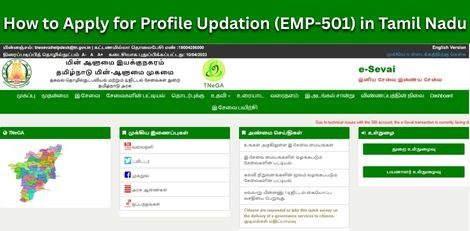
How to Apply for Profile Updation (EMP-501) in Tamil Nadu
Service Code: EMP-501 | Department Charges: ₹0 | Service Charge: Varies Purpose: This service allows individuals already registered with the Tamil Nadu Employment and Training Department to update their personal, educational, skill, or technical details in their employment exchange profile, ensuring their records are current for job matching and government schemes. Prerequisites: – Existing Registration Number with Employment Department – Valid CAN (Citizen Access Number) – Updated supporting documents for changes (if applicable) Application Process: 1. Login to E-District Portal as Operator – Visit: https://www.tnesevai.tn.gov.in/ – Select Operator Login – Enter Username, Password, and Captcha – Click Login 2. Navigate to Employment & Training Department – Click on Services – Select Department Wise – Employment and Training 3. Select Profile Updation Service – Click on EMP-501 Application for Profile Updation 4. Fetch Existing Profile – Enter the applicant`s Registration Number – Click Fetch Details – System will populate existing personal details 5. Update Personal Details – Edit editable fields such as: – Mobile Number – Email ID – Address – Marital Status – Other relevant personal information – Ensure Aadhaar number is correct – Click Save 6. Update Qualification Details – Click QUALIFICATION DETAILS tab – Select Qualification Type – Enter updated qualification information – Click Add – Click Save 7. Update Skill Details – Click SKILL DETAILS tab – Select Skill Type – Enter updated skill information – Click Add – Click Save 8. Update Technical Details – Click TECHNICAL DETAILS tab – Select Technical Qualification Type – Enter technical course details – Click Add – Click Save 9. Submit and Generate Receipt – Click Submit – System will process the updation – Click Print Receipt – Save the receipt for your records Alternative Method – Recommended: Visit nearest eSevai / CSC Centre – Operator will assist with updation process – Help with document verification and data entry – Service charges apply as per current rates After Profile Updation: – Changes reflect immediately – Keep acknowledgement receipt – Updated profile improves job matching accuracy – Registration remains active Important Notes: – Only editable fields can be modified – Core details such as Name, Father`s Name, Date of Birth, Community mayay not be editable – Supporting documents may be required – Mobile and email updates are important for job alerts For issues, contact: Help Desk: eseva_helpdesk@tn.gov.in Toll-Free: 1800-425-3333 Apply Online: https://tnedistrict.tn.gov.in For assistance: Visit nearest eSevai / CSC Centre This guide is based on the Tamil Nadu e-District Application Training Manual (EMP-501 Application for Profile Updation). Government of Tamil Nadu, 2017.
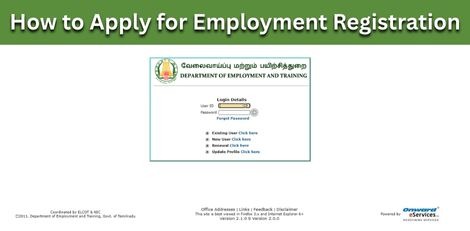
How to Apply for Employment Registration (EMP-503) in Tamil Nadu
Service Code: EMP-503 | Department Charges: ₹0 | Service Charge: Varies Purpose: This service allows eligible citizens to register with the Tamil Nadu Employment and Training Department for the first time, enabling access to employment exchange services, job notifications, and government employment schemes. Prerequisites: – Valid CAN (Citizen Access Number) – Active mobile number and email ID – Community Certificate – Address Proof (e.g., Voter ID, Aadhaar) – Educational and skill qualification details Application Process: 1. Login to E-District Portal as Operator – Select Operator Login – Enter Username, Password, and Captcha – Click Login 2. Navigate to Employment & Training Department – Click on Services – Select Department Wise – Employment and Training 3. Select New Registration Service – Click on EMP-503 Application for Registration 4. Fill Personal Details – Applicant`s full name, father`s name, mother`s name – Date of Birth, Gender, Marital Status – Religion, Community, Caste – Community Certificate number and issuing authority – User ID and Password for applicant`s portal access – Mobile Number and Email ID – Aadhaar Number – Complete address as per address proof – Employment Office, Taluk, Local Body, Village, Pincode – Employment Status – Reference Number (if any) – Click Save 5. Enter Qualification Details – Select Qualification Type – Enter Year of Passing, Subjects, Marks, etc. – Click Add for each qualification – Click Save 6. Enter Skill Details – Select Skill Type – Language, Skill Level, Certificate Details – Click Add – Click Save 7. Enter Technical Details – Select Technical Qualification Type – Enter course details, duration, institution – Click Add and Save 8. Generate and Download Receipt – Click Print Receipt – Download the Acknowledgement Receipt PDF – Keep the receipt for future reference Alternative Method – Recommended: Visit nearest eSevai / CSC Centre – Operator assistance – Document verification – Service charges apply as per current rates After Registration: – Registration Number will be generated – Keep acknowledgement receipt safe – Registration ID can be printed later using EMP-502 service – Renew registration annually using EMP-504 service Important Notes: – All personal details must match official documents – Mandatory fields cannot be left blank – Community Certificate is mandatory – User ID and Password are required for portal login – Registration must be renewed every year – Help Desk: eseva_helpdesk@tn.gov.in – Toll-Free: 1800-425-3333 For assistance: Visit nearest eSevai / CSC Centre This guide is based on the Tamil Nadu e-District Application Training Manual (EMP-503 Application for Registration). Government of Tamil Nadu, 2017.

Gold Price Drops Today (Dec 31); Silver Rates Remain Unchanged in Chennai
Gold prices in Chennai fell sharply today (December 31), bringing some relief to buyers after days of steady gains. The price of one sovereign (8 grams) of gold has dropped by ₹400, and is now being sold at ₹1,00,400. Today’s Gold Rates in Chennai 22-carat gold: Down by ₹50 per gram, now at ₹12,550 per gram 24-carat gold: Down by ₹55 per gram, now at ₹13,690 per gram 24-carat gold (1 sovereign): Down by ₹440, now priced at ₹1,09,528 Silver Price Today There is no change in silver prices today: Silver (per gram): ₹258 Silver (per kilogram): ₹2,58,000 Silver prices had touched recent highs over the past few days and are currently holding steady.

How Protein Naturally Supports Fat Loss
Eating more protein can help regulate appetite, boost metabolism, and protect muscle during weight loss. It influences both how much you eat (calories in) and how many calories you burn (calories out). How Protein Helps with Weight Loss 1. Adjusts Key Hormones – Lowers ghrelin (hunger hormone) – Increases GLP-1, PYY, and CCK (satiety hormones) Result: less hunger and longer fullness Bottom line: More protein can lower appetite naturally, reducing calorie intake without strict dieting. 2. Burns Calories During Digestion Protein has the highest thermic effect of food (TEF): – Protein: 20–30% of calories burned – Carbs: 5–10% – Fat: 0–3% Bottom line: Your body uses more energy to process protein, increasing calorie burn. 3. Boosts Daily Energy Expenditure Higher protein intake can: – Raise metabolic rate – Increase calories burned at rest – Maintain lean muscle Bottom line: May help burn more calories throughout the day, even while sleeping. 4. Reduces Appetite & Snacking Higher protein intake is more satiating, making portion control easier. – Can lead to consuming hundreds of fewer calories/day – Weight loss possible without calorie counting Bottom line: Supports natural, effortless calorie reduction. 5. Preserves Muscle & Metabolism When losing weight: – Muscle loss can reduce metabolism – Protein + strength training protects muscle – Aids long-term weight maintenance Bottom line: Helps retain muscle and support sustained fat loss. How Much Protein Do You Need? For weight loss, aim for: – 25–35% of daily calories from protein – Or 0.7 to 1 g per pound of body weight/day (1.5–2.2 g/kg) Example (2,000 calories/day): 150 g protein Spread intake across meals for best results. Sources of Protein – Chicken, turkey, lean beef, pork – Fish (salmon, sardines, trout) – Eggs & dairy (yogurt, cheese) – Beans, lentils, chickpeas – Whey or plant protein supplements Does protein burn belly fat? Higher protein diets are linked to reduced visceral fat around organs in some research. Can you lose weight just by eating more protein? Yes, if appetite decreases and calorie intake drops. No, if you overeat total calories. Is protein enough on its own? Best results with: – StStrength training – Whole-food diet – Moderate calorie deficit Disclaimer:This is general educational information, not personal medical or nutrition advice. Please consult a qualified professional before making changes to your diet or protein intake.

Auspicious (Nalla Neram) time today (Dec 31st)
December 31, 2025 – Wednesday | Margazhi 16 | Visuvavasu Year Auspicious Timings Morning 9:15 AM – 10:15 AM Evening 4:45 PM – 5:45 PM Shubh Hora Timings Morning 6-7-30,09-10 AM Evening 01.30-3, 4-5,7-10 PM Inauspicious Timings Emakandam 07:30AM – 09:00 AM Gulikai 10:30 AM – 12:00 PM Rahu 12:00 PM – 01:30 PM Astrological Details Thithi Duvadasi Nakshatram Bharani Chandrashtamam Chithirai Sulam North Remedy Milk

திருவண்ணாமலையில் மார்கழி மாத பவுர்ணமி கிரிவலம் வர சிறந்த நேரம்!
மார்கழி மாத பவுர்ணமி கிரிவலம், 02.01.2026 (வெள்ளிக்கிழமை) மாலை 6:45 மணிக்கு தொடங்கி, 03.01.2026 (சனிக்கிழமை) மாலை 4:43 மணிக்கு முடிவடைகிறது. இந்த நேரத்தில் பக்தர்கள் திருவண்ணாமலை அருணாசலேஸ்வரர் மலை சுற்றி கிரிவலம் செய்யலாம்.

Have a Sales SOP: Right Tools, Right People, Right Process Maximise Results – by J Sampath, Founder of JB Soft System
Many businesses ask this question: “Why are sales inconsistent even when we have good people?” The answer is often simple and uncomfortable: Because there is no clear Sales SOP (Standard Operating Procedure). Sales success is not accidental. It is the outcome of clarity, discipline, and consistency. Sales Without SOP Is Like Driving Without a Map When there is no defined SOP: – Every salesperson follows their own style – Leads are handled differently by different people – Follow-ups depend on memory, mood, or pressure – Results fluctuate month after month Good salespeople may still perform. But the business cannot scale. An SOP is what converts individual effort into organizational performance. Right People Alone Are Not Enough Many business owners believe: “If I hire good salespeople, results will come.” Good people are important. But even the best people fail in a weak system. Without SOP: – New team members struggle – Seniors get overloaded – Knowledge stays in individuals, not in the company A strong SOP supports people, guides them, and reduces dependency on individuals. Right Tools Make SOP Work in Real Life An SOP written on paper is not enough. It must be executed daily. This is where the right tools matter: – Lead tracking – Follow-up reminders – Activity visibility – Performance measurement When tools support the SOP: – Discipline becomes automatic – Follow-ups become timely – Reviews become factual, not emotional Tools don’t control people. They enable consistency. Sales SOP Is Not a One-Time Exercise One common mistake businesses make: “We have created an SOP. Job done.” Sales SOP is a living system, not a static document. Markets change. Customer behavior changes. Team strength changes. So SOP must be: – Revisited periodically – Fine-tuned consciously – Improved based on real experience Every review should ask: – What is working well? – Where are leads getting stuck? – Which step creates confusion or delay? Conscious Improvement Is the Real Advantage Organizations that grow consistently do one thing well: They improve consciously, not accidentally. They don’t wait for failure to react. They proactively refine their sales process. Small improvements in SOP create: – Better conversion ratios – Shorter sales cycles – Happier customers – Confident sales teams Final Reflection Sales is not about pressure. It is about process clarity. When you have: – The right people – Supported by the right tools – Working within a clear and evolving SOP Results are no longer random. They become predictable and scalablele. Revisit your Sales SOP. Refine it consciously. Because sustainable growth is always built on strong processes.

How to Apply for Employment Registration Renewal (EMP-504) in Tamil Nadu
Service Code: EMP-504 | Department Charges: ₹0 | Service Charge: ₹15 Purpose: This service allows individuals already registered with the Tamil Nadu Employment and Training Department to renew their registration, ensuring continued eligibility for employment exchange services and benefits. Required Documents: – Registration Number (issued by Employment Office) – Valid CAN (Citizen Access Number) for the applicant Special Requirement: – Applicant must have an existing registration with the Employment and Training Department that is due for renewal. Application Process: 1. Login to E-District Portal – Visit: https://tnedistrict.tn.gov.in – Click on Operator Login – Enter Username, Password, and Captcha – Select Service Operator Type → Click Login 2. Navigate to Employment & Training Department – After login, click on Services – Select Department Wise → Employment and Training 3. Select Application for Renewal Service – Click on EMP-504 Application for Renewal 4. Enter Registration Details – Enter your Registration Number – Verify User Charge: ₹15 – Click Submit 5. Confirm and Complete Renewal – A confirmation pop-up will appear → Click OK – System processes the renewal and generates a Payment Receipt 6. Download Receipt – Download the Receipt PDF – Keep a printout for your records Alternative Method – Recommended: Visit nearest eSevai / CSC Centre – Operator will assist with the renewal process – Same ₹15 service charge applies – Immediate receipt provided After Renewal: – Registration remains active for the renewed period – Keep the renewal receipt as proof of payment – Registration ID can be printed separately using EMP-502 service if needed Important Notes: – Renewal must be completed before registration expires – ₹15 service charge is mandatory – Registration Number must be correct for successful renewal – For issues, contact: – Help Desk: eseva_helpdesk@tn.gov.in – Toll-Free: 181800-425-3333 – Service available only for existing registered candidates Apply Online: https://tnedistrict.tn.gov.in For assistance: Visit nearest eSevai / CSC Centre *This guide is based on the Tamil Nadu e-District Application Training Manual (504-Application for Renewal). Government of Tamil Nadu, 2016.*

Gold Prices Dip in Chennai on December 30 After Hitting Yearly Peak
Gold prices witnessed a steep correction on December 30 after touching their highest level of the year. The yellow metal plunged by ₹3,360 per sovereign in a single session, bringing the price down to ₹1,00,800 per sovereign (8 grams) and ₹12,600 per gram, a fall of ₹420 per gram. On December 29, gold was priced at ₹1,04,160 per sovereign and ₹13,020 per gram, already down by ₹640 from the previous session. Earlier, on the evening of December 27, gold had reached its yearly high at ₹1,04,800 per sovereign and ₹13,100 per gram. The recent volatility follows a strong rally driven by the US Federal Reserve’s rate cut and indications of further easing, which weakened the dollar and boosted safe-haven demand. A record-low rupee also supported domestic gold prices. From January 1, when gold stood at ₹57,200 per sovereign (₹7,150 per gram), prices have surged by ₹43,600—an increase of about 76.2%—before the latest correction. Silver prices also declined, falling by ₹23 to ₹258 per gram (₹2,58,000 per kg) on December 30. Recent Price Trend (22-carat gold): – Dec 29: ₹1,04,160 per sovereign | ₹13,020 per gram – Dec 27: ₹1,04,800 per sovereign | ₹13,100 per gram – Dec 26: ₹1,03,120 per sovereign | ₹12,890 per gram – Dec 25: ₹1,02,560 per sovereign | ₹12,820 per gram – Dec 24: ₹1,02,400 per sovereign | ₹12,800 per gram Silver (per gram): – Dec 29: ₹281 – Dec 27: ₹285 – Dec 26: ₹254 – Dec 25: ₹245 – Dec 24: ₹244 The sudden dip has brought some relief to buyers, even as gold continues to trade near historically high levels.
